How to Leverage Flow Metrics To Accelerate Your Agentic Development Lifecycle
flow metrics still matter agentic ai developmentAI agents make it remarkably easy to start and generate work. Here is how I would use WIP, work item age, cycle time, and throughput when code review and customer learning cannot keep up.
 Click image to open full size
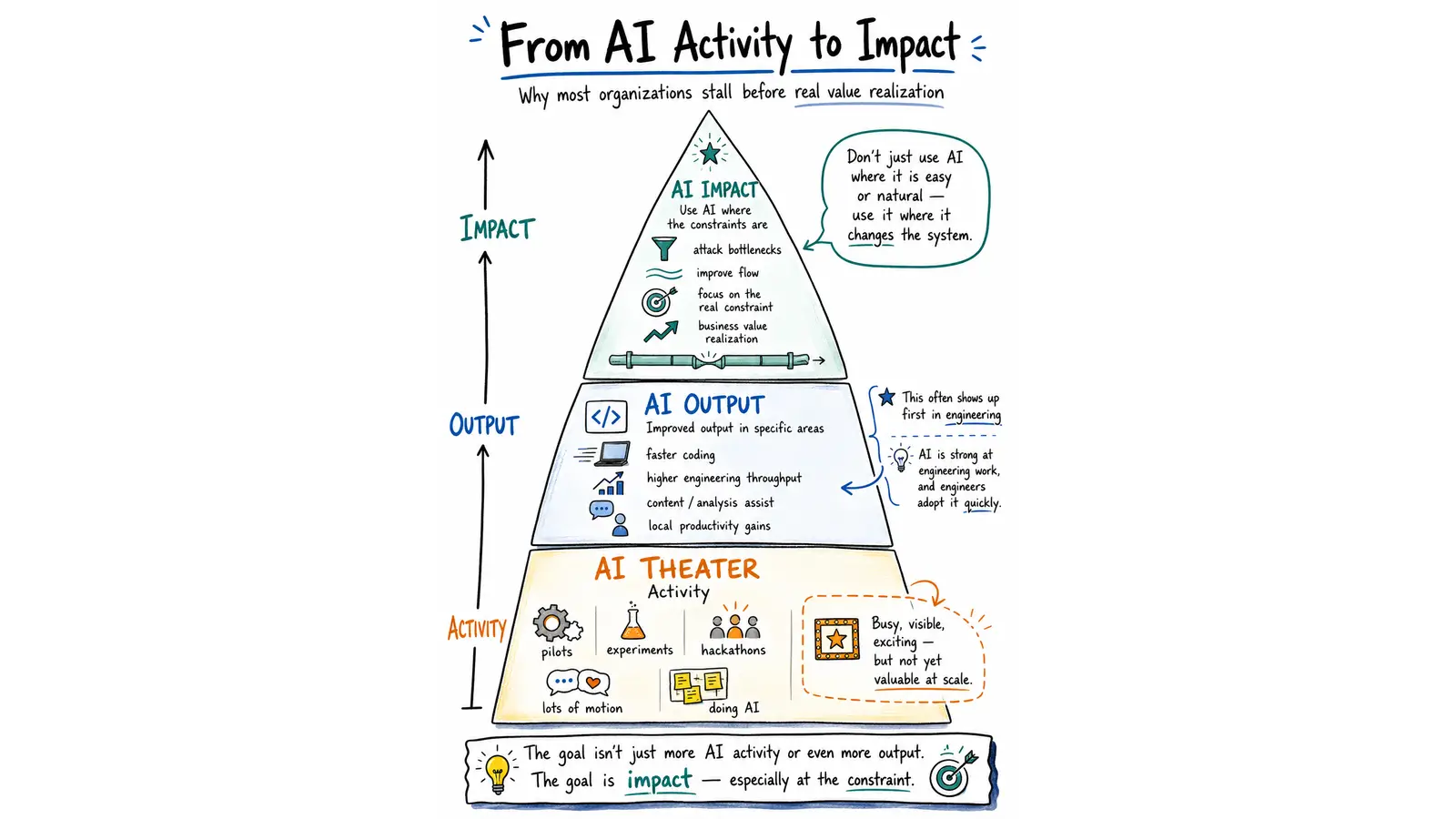
 Isn’t it surprising that 10x coding doesn’t move the needle that much?
Fully agentic software factories are of course all the rage these days. But more and more leaders I talk to acknowledge that while creating a fully agentic software development lifecycle - is feasible, they haven’t yet nailed the approach that makes it trustable.
AI is making some steps in the workflow such as specifying and coding and testing much faster and cheaper. But humans are still very much involved in the lifecycle. And the overall throughput isn’t dramatically different and far from the 10x promises everyone is in FOMO on.
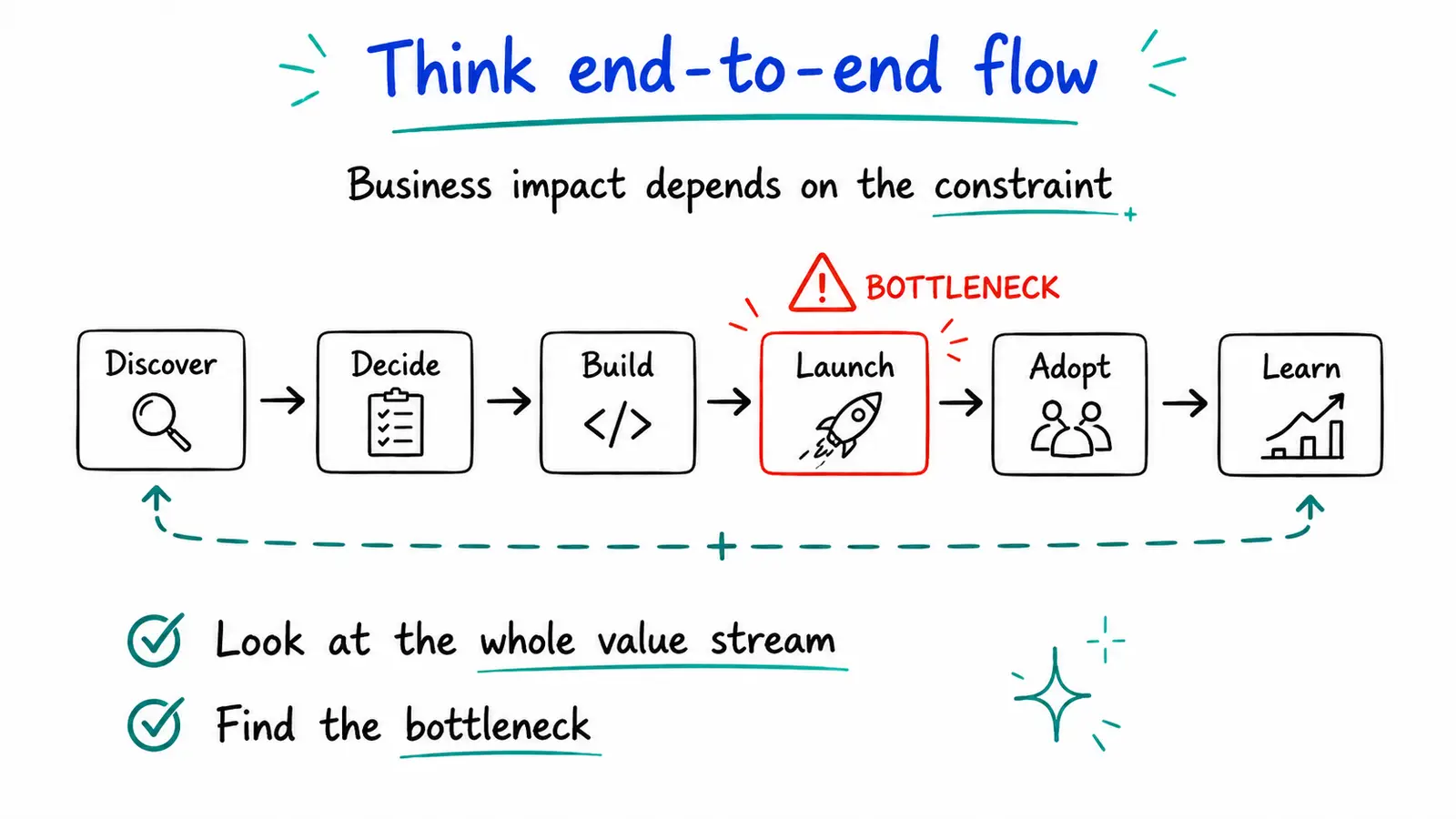
Optimizing an agentic software factory requires seeing it as a flow system
When a leader pulls me into a conversation about this, my go to tool is the flow perspective. Seeing the software factory end to end. Visualizing how work is flowing. And where it gets stuck.
In this article I’m sharing my playbook for troubleshooting and optimizing the flow in an agentic software development lifecycle (aka software factory). This is based on what I’ve been doing and teaching others how to do for almost 2 decades. Because even though AI changes some of the attributes of the software factory, it doesn’t change the “laws of physics” that affect it. Reinertsen’s Principles of Product Development Flow and Managing the Design Factory still very much apply.
Agentic software development output gets stuck in human queues
Imagine you are the VP of Engineering on Monday morning. Over the weekend, one of your engineers used an agent to complete most of a migration that had been sitting in the backlog for months. Another team has three AI-generated pull requests ready for review. A product manager has a surprisingly convincing prototype for an idea that was only discussed on Friday.
When people ask, you brag about 10x speed. But you know that the reality is a bit more complex. That this speed hasn’t turned into throughput yet. While the agents are running very fast, you know that without proper human guidance that speed turns into slop. Features that might work but aren’t really useful. Or aren’t aligned to the architecture.
So the reality is that between very fast agentic turns you have human intervention. And because the agents are so fast, the work for the humans is piling up. and up. and up. The factory doesn’t look that neat anymore. It looks like piles of inflight inventory that hasn’t been reviewed yet.
The migration is waiting for the one architect who understands the affected services. Pull requests (PRs) are accumulating because the agents keep working while review waits. And you see more and more conflicts between PRs - breaking your continuous integration. The prototype has triggered a debate about whether anyone actually wants the feature. Meanwhile, the engineers get the agents started on even more work because they don’t want to sit idle. And even worse, they don’t want the agents to sit idle. (God forbid they have unused tokens at the end of the month, right?)
AI coding’s speed moves the bottleneck, but doesn’t eliminate it.
Cycle time tells us the REAL speed of our lifecycle
While performing the individual activities in the feature lifecycle faster can be useful, what we care about is the end to end speed. How long it takes a feature to flow from early consideration/prioritization to value realization. That’s exactly what the cycle time metric focuses on.
Cycle time looks beyond just the development time, or deploy time. It isn’t a measure of engineering speed. When AI moves accelerates activities such as coding and testing, it’s even more important to look end to end. To consider feature adoption, usage, retention, and initial improvement iterations, as part of the cycle.
Throughput forces an honest conversation about what counts
Throughput measures the number of features which make it to the finish line per time period.
It is not uncommon to see local 10x acceleration turn into meagre or non-existent throughput improvements end to end, since the acceleration only gets features faster to the bottleneck where they pile up even higher unless we do something to elevate the bottleneck.
WIP tells us whether the new speed is creating a traffic jam
AI makes starting work feel almost free. Someone mentions a useful idea and, twenty minutes later, there is a worktree. An engineer wonders whether a library migration would work and asks an agent to try it. A product manager asks their AI agent for a spec based on a quick description of an ask that came over in email, barely takes a look at what looks like a well considered PRD (AI’s documents always feel comprehensive, don’t they?) and an engineer pulls the spec and launches an agent swarm to work on it.
Each start sounds reasonable on its own. Together they can overwhelm.
Feature-level Work in Process is the number of features and experiments currently in flight. It includes a breakdown into how many are in each step in the end to end value stream. How many are still being implemented? How many have moved into code review? How many have been merged but not released? How many are live but still haven’t told us whether they helped the customer?
Work item age tells us where attention is needed today
Work item age points our attention at items that are moving slower than others through the lifecycle.
I like work item age because it shows trouble while there is still time to do something about it.
Think about two features that have both been active for ten days. One is in the release lane and scheduled to go live tomorrow. The other is sitting in code review because the reviewer found an unanswered product question. They have the same age, but very different chances of reaching a customer soon.
Even when AI agents are involved, work will often age while waiting for humans. I see that in my own agentic workflows. The more things I do, the more likely it is for some of them to go stale.
Work item aging is a leading indicator to cycle time. When we inspect ongoing flow (e.g. at a Daily Scrum, or when our flow agent runs its routine inspection loop), looking at the items aging the most is a useful area to focus on, and figure out:
- What is this item actually waiting for?
- Can more agentic work help?
- Who can make the decision it needs?
- Should we review it, split it, ship it, pause it, or stop it?
Flow efficiency highlights delays and waits in our workflow
Trustable agentic development is characterized by spurts of fast progress by agents followed by periods of waiting for humans. Our definition of workflow should let us see when features are moving and when they are waiting.
While these waits/delays are inherent, we want to make sure we understand what they are so we can explore ways to shorten them.
Using Feature-level Flow Metrics in your Agentic Cadence
One of the main questions teams who start scaling agentic workflows ask me is what cadence of meetings makes sense. Do we need Sprints? Sprint Planning? Reviews? Retrospectives? Quarterly planning?
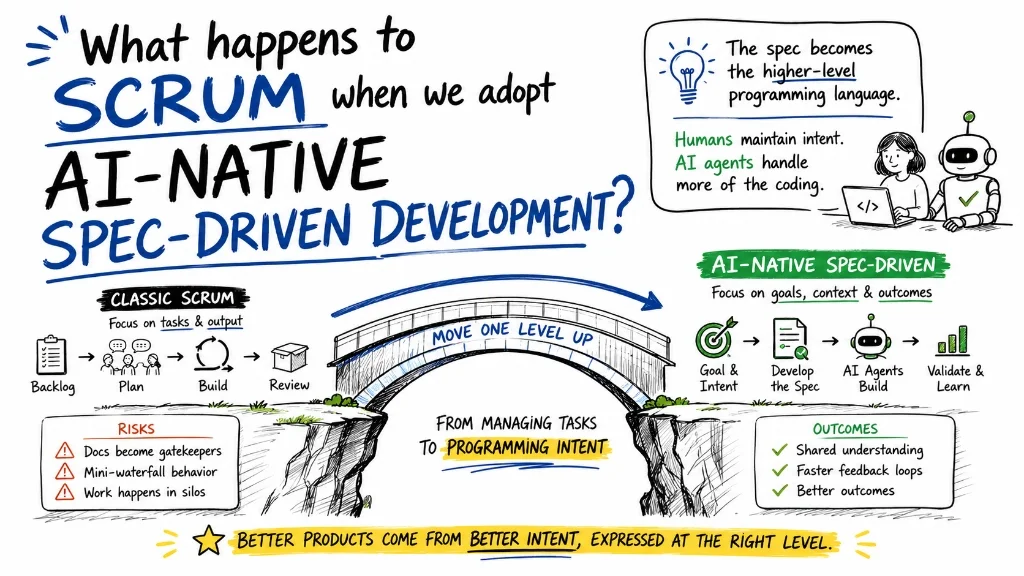
My take is that as long as humans need to align/coordinate/collaborate/stay in the loop at some level, it makes sense to maintain a cadence of inspecting and adapting our intent, the result of our work, and our processes. Like the entire process, the cadence will inspect and adapt at a higher altitude. Instead of inspecting stories, we will look at features. Instead of limiting our perspective to “is this working as specified” we will look at “Is this being adopted? Is it helping people?”. This makes for a much more interesting and higher impact inspection and adaptation.
Planning
While agents are faster, they still have limited capacity. And that capacity also costs tokens. If we want to optimize the value humans and their agents will create, we need to consider our feature throughput and pull in the right amount of features, otherwise we will spread ourselves too thin.
We should start with looking at the features currently in flight (Work item aging is a useful view here) and focus on a plan for finishing them before starting new ones.
Then we look at our historical throughput. If it shows us we can deliver between 4-5 features every 2 weeks, taking on 10 is bound to result in a pileup. Taking on 4-5 is more likely to be the right amount, unless we’ve recently seen significant improvement.
If there’s a specific deadline attached to one of the features in our backlog, our cycle times and service level expectations can help us figure out when it makes sense to get going on it. If, for example, we know based on past cycle times that we can finish 85% of our features within 5 days end to end, that can help us decide if/when to start working on a feature that needs to be finished on a specific day.
Reviews - One way to coordinate human perspective and decision making
When features flow fast, we prefer continuous review/feedback rather than waiting for a scheduled event. Having said that, there’s still value in stepping back from the individual feature and reviewing the bigger picture. Are all these features we’re delivering moving the needle towards our goals?
There’s still value in a diverse set of people getting into a room and inspecting intent, specifications, designs, architecture, working product, or product telemetry. Getting all these people into a room every time a feature hits a stage in the pipeline can become a meeting nightmare. We want more and more people to shift to a “makers schedule” where they have fewer and fewer meetings. It might not be intuitive, but the right cadence can be an efficient way to coordinate feedback and perspective across multiple people, while letting them stay in the flow in between.
Continuous Improvement
Process improvement is one activity that really benefits from a cadence. From stepping away from the day to day flow of work to look at ourselves from the outside. To look at flow patterns and design improvement experiments.
This is where inspecting our cycle times, WIP, throughput can help us understand what’s going on.
It is where we look at where AI made us faster, and what became the constraint as a result?
If we see that 85% of our features spend at least 7 days waiting for a broad forum design review, we can discuss ways to shorten that, e.g. by introducing a more frequent cadence of standing design reviews, or introducing an async design review, or whatever other pattern makes sense.
Flow metrics don’t care about your process
These flow metrics are useful regardless of what process you use. Whether it’s spec-driven-development, an in-house or open source harness, whether it’s skill-based or an agent-swarm.
You still want to know your throughput. Your cycle times. The amount of Work in Process. And how it’s aging.
Because you still want to maximize the amount of value you’re creating by delivering valuable features and using the speed of delivery to inspect and adapt more effectively.
Flow metrics still matter in the age of agentic development. They actually matter even more.
Practical thinking on turning AI pilots, adoption, and portfolio work into business impact - by finding the constraint, changing the work, and proving value as you go.
Yuval Yeret helps product and tech leaders move from agile theater to evidence-informed delivery. Work with Yuval →